Introduction
Modern computers often provide plenty of processing power while offering fewer physical ports than users expect. A laptop may have only a small selection of USB connections, while a desktop computer can have ports positioned inconveniently around the chassis. Once a keyboard, mouse, external storage drive, printer, card reader, webcam, or other accessory is connected, available ports can disappear quickly.
A USB hub provides a straightforward way to expand the number of USB connections available from a single host port. Instead of repeatedly unplugging accessories, users can connect several compatible peripherals through one hub.
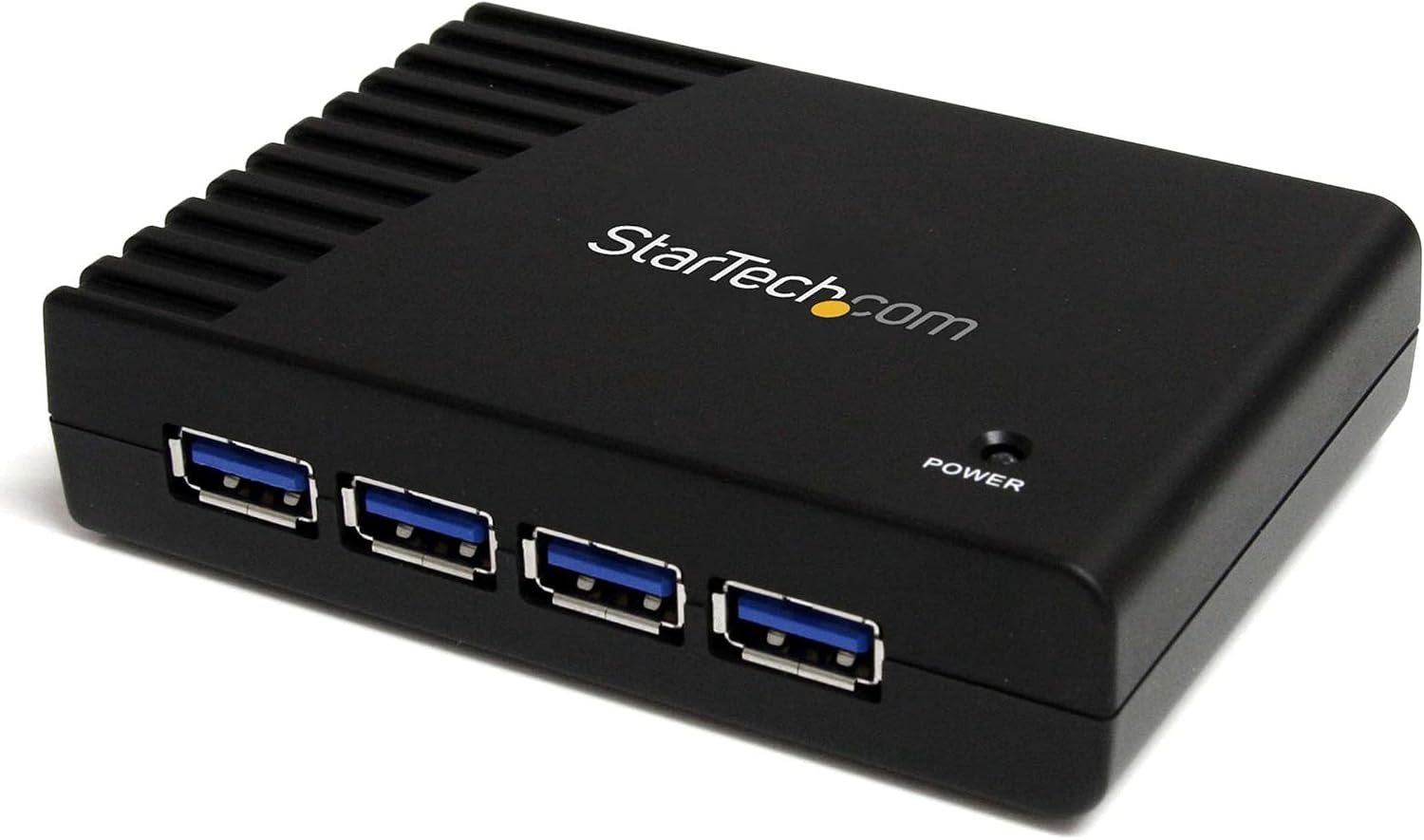
The StarTech 4-Port USB-A Hub, 5Gbps, Power Adapter Included (ST4300USB3) is designed around this concept. It provides four USB-A ports through a single connection to a computer and supports USB 3.0 data transfer rates of up to 5Gbps when used with compatible USB 3.0 hardware and connections. The hub is also backward compatible with USB 2.0 and USB 1.x devices.
One notable aspect of this model is its included external power adapter. The hub can operate without external power in certain configurations, but StarTech’s documentation recommends connecting the adapter when the goal is to provide full power to the USB ports.
This makes the ST4300USB3 relevant for users who need additional USB-A connectivity for a workstation, home office, desktop computer, laptop, or other compatible system.
This guide looks at the product from an informational perspective, explaining its main features, how a powered USB hub works, practical use cases, compatibility considerations, and how this type of hub compares with other USB connectivity options.
Understanding What a USB Hub Does
Before looking at the specific features of the ST4300USB3, it helps to understand the role of a USB hub.
A computer’s USB port is normally designed to communicate with a peripheral such as a keyboard, mouse, storage device, printer, or other accessory. A hub allows that single host connection to serve multiple downstream USB devices.
In simple terms, the hub acts as an intermediary between the computer and connected peripherals.
For example, imagine a desktop setup with only one conveniently accessible USB port. Instead of connecting one device and leaving the others disconnected, a four-port hub can provide four downstream USB-A connections.
The hub does not create four completely independent high-speed connections to the computer. The connected devices share the bandwidth available through the host connection. This distinction becomes particularly important when several high-bandwidth devices are transferring data simultaneously.
USB hubs are therefore primarily about connectivity and organization, while their actual performance depends on the USB standard, host connection, connected devices, cables, and workload.
Key Features
Four USB-A Downstream Ports
The ST4300USB3 provides four USB-A ports for connecting compatible peripherals. StarTech identifies the device as a four-port SuperSpeed USB 3.0 hub.
USB-A remains widely used for many accessories, including:
- Keyboards
- Mice
- USB flash drives
- External hard drives
- External SSD enclosures
- Printers
- Webcams
- USB audio equipment
- Card readers
- Game controllers
- Other USB peripherals
Having four ports can be useful when several devices need to remain connected simultaneously.
For a workstation, for example, one hub could accommodate a keyboard, mouse, external storage device, and another USB accessory without requiring repeated cable changes.
USB 3.0 and 5Gbps Maximum Data Rate
The ST4300USB3 uses USB 3.0 technology, now commonly referred to as USB 3.2 Gen 1 in current terminology. The maximum interface data rate is 5Gbps.
This specification represents the maximum theoretical link speed rather than a guaranteed real-world file-transfer rate.
Actual performance can be affected by numerous factors, including:
- The computer’s USB controller
- The host port
- The connected peripheral
- Cable quality
- File type
- Storage performance
- Simultaneous transfers
- Operating-system activity
- USB protocol overhead
For example, an external storage device connected through the hub cannot necessarily reach the same practical performance in every situation as it would when connected directly to a compatible host port.
Nevertheless, USB 3.0 provides substantially more theoretical bandwidth than USB 2.0, making it useful for many everyday peripherals and compatible storage devices.
Backward Compatibility
The ST4300USB3 supports USB 2.0 and USB 1.x devices as well as USB 3.0 peripherals.
This is useful because many computer accessories continue to use older USB standards.
A USB 2.0 keyboard, for example, does not require USB 3.0 bandwidth to operate. The same applies to many mice, printers, and other low-bandwidth peripherals.
The important limitation is that a connected USB 2.0 device will operate according to the capabilities of the relevant USB connection rather than suddenly gaining USB 3.0 performance.
The same principle applies to the host connection. If the hub is connected to a USB 2.0 host port, the overall connection can be limited to USB 2.0 speeds. StarTech’s installation documentation specifically notes this limitation.
Included External Power Adapter
One of the more practical characteristics of the ST4300USB3 is the included AC power adapter.
USB hubs can be bus-powered, meaning they draw their operating power from the computer’s USB connection. This can be sufficient for low-power accessories such as keyboards and mice.
However, multiple connected devices can create greater power demands.
The ST4300USB3 can be used with its external power adapter to provide additional power to the downstream USB ports. StarTech’s documentation states that external power is optional but recommends connecting the adapter to ensure the ports are fully powered.
The current datasheet lists the included AC adapter as accepting 100–240V AC and providing 5V DC at 2A.
This powered design can be particularly relevant when several peripherals are connected at once.
Plug-and-Play Operation
The ST4300USB3 is designed to work without additional drivers or special software. The current datasheet identifies it as operating-system independent and requiring no additional drivers or software.
The basic setup is straightforward:
- Connect the included power adapter when external power is needed.
- Connect the hub to the computer using the USB cable.
- Connect compatible USB peripherals to the hub.
- Allow the operating system to recognize the devices.
The exact behavior of individual peripherals will still depend on the operating system and the peripheral itself.
Desktop Form Factor
The hub uses a desktop-oriented form factor. Current documentation lists dimensions of approximately 3.8 inches in length, with a black plastic enclosure.
The design is intended to sit on a desk or workstation rather than function primarily as an ultra-small travel dongle.
This distinction matters when choosing a USB hub.
A compact bus-powered hub can be convenient for travel, while a powered desktop hub can make more sense when several peripherals remain connected in one location.
Power Indicator
The ST4300USB3 includes a power LED. The current datasheet identifies one blue power indicator.
A simple power indicator can make troubleshooting easier because it provides a quick visual indication that the hub itself is receiving power.
How It Can Be Used
Expanding a Desktop Computer
One of the most straightforward applications is expanding USB connectivity on a desktop PC.
A user might connect:
- Keyboard
- Mouse
- USB headset
- Flash drive
through the hub while keeping the computer’s other ports available for additional equipment.
For a permanent workstation, this can also make cable management easier because frequently used peripherals can remain attached to a single hub.
Connecting External Storage
The USB 3.0 interface can be useful for compatible storage devices such as external hard drives, SSD enclosures, and flash drives.
A user could connect an external storage device through one of the hub’s ports for file transfers or backups.
However, storage performance should be considered carefully.
Because multiple devices connected to a USB hub share the available upstream connection, simultaneous transfers can compete for bandwidth. If maximum storage performance is critical, a direct connection to a suitable host port may be preferable.
Home Office Workstations
Home office setups often combine several USB accessories.
A typical workstation might include a keyboard, mouse, webcam, printer, microphone, and external storage.
Not all of these need to be connected simultaneously, but having additional accessible ports can reduce the inconvenience of repeatedly switching cables.
The powered nature of the hub can also be useful when multiple peripherals are connected.
Temporary Workstations
A USB hub can also help when creating a temporary workspace.
For example, someone might connect a laptop to a desk where a keyboard, mouse, USB storage device, and other peripherals are already arranged.
Rather than connecting each accessory separately every time, a hub can provide a central connection point.
IT and Technical Work
USB hubs are also common in technical environments where computers need to interact with multiple peripherals.
Possible examples include:
- Diagnostic equipment
- USB serial adapters
- External storage
- Input devices
- USB testing equipment
- Flash drives
- Keyboard and mouse combinations
The exact suitability depends on the specific equipment and its power and bandwidth requirements.
Connecting Older USB Accessories
Because the ST4300USB3 supports USB 1.x and USB 2.0 compatibility, it can also serve as a connection point for older accessories.
This can be useful in environments where replacing every older USB device is unnecessary.
For example, a legacy keyboard may work perfectly well for its intended purpose even though it does not use modern USB speeds.
Understanding Power Requirements
Power is one of the most important concepts to understand when using a USB hub.
A computer’s USB port can supply power to connected peripherals, but that available power is not unlimited.
Low-power devices generally place modest demands on the system. Storage devices, optical devices, external accessories, and certain other peripherals may require more.
When multiple devices are connected, the combined power requirements can become important.
The external adapter included with the ST4300USB3 is designed to address this issue.
StarTech documentation specifies a 5V, 2A power adapter for the hub.
Using the supplied adapter according to the manufacturer’s instructions can help provide the hub with the power needed for connected peripherals.
It is still important to understand that an external power adapter does not eliminate every possible limitation. Individual USB devices have their own power requirements, and the hub has a defined electrical design.
If a peripheral has unusually high power requirements, its manufacturer documentation should be consulted.
Who It May Be Suitable For
Desktop PC Users
Users with desktop computers that have limited convenient USB-A access may find a four-port hub useful for organizing frequently used peripherals.
Home Office Users
A home office often contains several USB devices, making additional ports practical.
The external power adapter can also be relevant for users who expect to connect multiple peripherals.
Professionals With Fixed Workstations
People who work at a dedicated desk may appreciate having their USB connections consolidated in one location.
This can simplify cable management and make accessories easier to access.
Students
Students using computers for schoolwork may need to connect storage devices, keyboards, mice, printers, and other accessories.
A four-port hub can provide additional flexibility without requiring permanent changes to the computer.
IT Professionals and Technicians
The hub’s multiple USB-A ports and backward compatibility may be useful in technical environments where several USB peripherals need to be connected.
However, specialized equipment should always be checked for compatibility and power requirements.
Users With Older USB-A Accessories
People who already own USB-A peripherals can use a hub designed around USB-A ports without immediately replacing those accessories with newer USB-C versions.
Important Things to Consider
The Hub Does Not Create Unlimited Bandwidth
A four-port hub does not mean that every connected device receives an independent 5Gbps connection to the computer.
The devices share the bandwidth of the upstream USB connection.
This becomes especially relevant when transferring large files through multiple storage devices at the same time.
For ordinary peripherals such as keyboards and mice, bandwidth sharing is usually far less significant because these devices typically generate relatively small amounts of data.
The Host Port Matters
The hub’s maximum 5Gbps capability depends on having a compatible USB 3.0 or later host connection.
If the hub is connected to a USB 2.0 host port, performance will be limited accordingly. StarTech explicitly documents this behavior.
Before troubleshooting slow transfers, it is therefore useful to check the USB standard supported by the computer’s physical port.
USB-A Compatibility
The ST4300USB3 is designed around USB-A downstream ports and uses a USB Type-B connection on the hub side according to the product documentation.
This is different from newer USB-C hubs that may provide USB-C downstream ports or use USB-C as the host connection.
Users with newer computers should therefore consider the ports available on their particular system.
An appropriate adapter may be required if the computer does not have a compatible USB-A host connection.
It Is Not a Full Docking Station
A USB hub should not be confused with a full docking station.
The ST4300USB3 is designed primarily to expand USB connectivity.
A docking station may additionally provide features such as:
- HDMI or DisplayPort video
- Ethernet
- SD or microSD card readers
- Audio connections
- USB-C Power Delivery
- Multiple display support
Those functions are outside the basic purpose of this four-port USB hub.
External Power Requires an Outlet
The included power adapter is useful when additional power is required, but it also introduces a practical consideration: the hub needs access to an AC outlet when using the adapter.
This makes a powered hub particularly appropriate for desks and fixed workstations.
Travelers who prioritize minimum cable count may prefer a compact bus-powered hub for certain situations.
Cable Placement
A hub can improve accessibility, but cable management still matters.
A good arrangement places the hub somewhere easily reachable without creating tension on the USB host cable or connected peripheral cables.
This can be particularly useful when the computer’s built-in USB ports are located on the back or side of a desktop system.
Comparing General USB Connectivity Categories
Basic Bus-Powered USB Hubs
Bus-powered hubs draw power from the computer.
They are generally simple and portable and can work well with low-power peripherals.
Their limitation is that the host connection must supply the hub and connected devices with available power.
Powered USB Hubs
Powered hubs use an external adapter.
This adds a cable and requires access to an electrical outlet, but it can provide a more appropriate setup for multiple connected peripherals.
The ST4300USB3 belongs to this category when its included adapter is connected.
USB-C Hubs
USB-C hubs are designed for computers and devices equipped with USB-C ports.
Depending on the model, they may provide USB-A, USB-C, display, networking, storage-card, or charging functionality.
They are often more versatile than a simple USB-A hub, but they can also have different compatibility and power-delivery characteristics.
Docking Stations
Docking stations generally provide a broader collection of connections.
They are often designed for users who want to transform a laptop into a more complete desktop workstation.
A docking station can therefore be more appropriate when video output, networking, charging, and multiple peripheral types are required.
USB Expansion Cards
Desktop computers can sometimes be upgraded with an internal USB expansion card.
This provides additional physical USB ports directly on the computer.
It is a different approach from an external hub and usually requires opening the computer case and installing hardware.
For users who need simple external expansion, a USB hub can be easier to deploy.
Practical Setup Tips
Use the Included Power Adapter When Appropriate
If multiple devices are connected, particularly peripherals with greater power requirements, using the supplied adapter according to the manufacturer’s instructions is a sensible starting point.
StarTech specifically recommends external power when the objective is to ensure the USB ports are fully powered.
Connect the Hub to a Compatible USB 3.0 Port
For workloads requiring higher data-transfer performance, connect the hub to a USB 3.0-compatible host port.
A USB 2.0 host connection will limit the hub’s operating speed.
Avoid Unnecessary Bandwidth Competition
If several storage devices are transferring large amounts of data simultaneously, performance can be affected because the devices share the upstream connection.
For particularly demanding workloads, connecting high-performance storage directly to the computer may make more sense.
Keep Cables Organized
Place the hub where the majority of connected devices can reach it comfortably.
This can reduce cable clutter and make frequently used ports easier to access.
Check Peripheral Requirements
Before connecting specialized equipment, review the manufacturer’s requirements for USB version, power, operating-system support, and any required software.
A generic USB hub cannot guarantee compatibility with every specialized USB device.
Frequently Asked Questions
What is the StarTech ST4300USB3?
The ST4300USB3 is a four-port USB-A hub designed to add four USB 3.0 connections through a single USB connection to a compatible computer. It supports data transfer rates of up to 5Gbps and includes an external power adapter.
Does the ST4300USB3 support USB 2.0 devices?
Yes. The hub is backward compatible with USB 2.0 and USB 1.x devices.
Can the hub work without the power adapter?
Yes, StarTech’s documentation states that external power is optional. However, the manufacturer recommends connecting the external adapter to ensure the USB ports are fully powered.
What is the maximum data-transfer speed?
The hub supports a maximum USB 3.0 data-transfer rate of 5Gbps under compatible conditions.
Actual transfer speeds can be lower because of protocol overhead, connected hardware, host limitations, storage performance, and simultaneous activity.
Will connecting the hub to USB 2.0 reduce performance?
Yes. StarTech’s installation documentation notes that when the hub is connected to a USB 2.0 host port, it will operate at USB 2.0 speeds.
Can I connect an external hard drive?
Compatible USB external hard drives can be connected, provided their power and interface requirements are appropriate.
When multiple high-bandwidth devices are active simultaneously, available USB bandwidth is shared.
Can I use it with a keyboard and mouse?
A keyboard and mouse are typical examples of USB peripherals that can be connected through a USB hub.
These devices generally have relatively modest bandwidth requirements.
Does it require special drivers?
StarTech’s current datasheet identifies the ST4300USB3 as operating-system independent and states that no additional drivers or software are required.
Individual connected peripherals may still require their own drivers or software.
Is the ST4300USB3 a USB-C hub?
No. The ST4300USB3 is a USB-A-focused USB 3.0 hub. The product documentation identifies four USB 3.0 Type-A downstream ports and a USB Type-B host-side connection on the hub.
Users with USB-C-only computers may need an appropriate adapter or a different hub design.
Does it charge smartphones?
The hub provides powered USB ports, but users should distinguish between supplying power to USB peripherals and a dedicated modern fast-charging solution.
Charging performance depends on the connected device, port behavior, power arrangement, and USB charging specifications.
The ST4300USB3 should not automatically be treated as a modern USB-C Power Delivery charger.
Is it suitable for a permanent desktop setup?
Its desktop-oriented design and included external power adapter make it suitable for situations where a computer and multiple USB peripherals remain in one location.
Can all four ports be used at the same time?
The hub is designed to provide four downstream USB ports, allowing multiple compatible devices to be connected simultaneously.
The practical limitations are the available power, shared bandwidth, host capabilities, and requirements of the connected devices.
Does a USB hub improve internet speed or computer performance?
No. A USB hub primarily expands physical USB connectivity. It does not increase the computer’s processor performance or internet bandwidth.
Is it a docking station?
No. The ST4300USB3 is a USB hub rather than a full laptop docking station.
Its primary purpose is to provide additional USB connectivity.
Conclusion
The StarTech ST4300USB3 illustrates the basic purpose of a powered USB hub: expanding the number of available USB connections while providing a practical way to connect several peripherals through one host connection.
Its four USB-A ports, USB 3.0 interface, backward compatibility with older USB standards, and included external power adapter make it relevant to desktop computers, home offices, technical workstations, and other environments where multiple USB peripherals need to remain connected.
The 5Gbps specification is useful to understand, but it should be interpreted as a maximum interface rate rather than a promise of a particular real-world file-transfer speed. Connected devices share the upstream connection, and the host computer, cables, storage hardware, and workload all influence actual performance.
The external power option is another important part of the design. While the hub can operate without external power in certain situations, StarTech recommends using the supplied adapter when full power availability across the USB ports is desired.
For anyone researching USB expansion, the most important questions are not simply how many ports a hub provides. Compatibility, USB standards, power requirements, bandwidth sharing, physical placement, and the types of peripherals being connected all matter.
If the ST4300USB3 matches the ports and requirements of your computer and accessories, it can provide a straightforward way to organize and expand a USB-A workstation.
You can check more details on Amazon here.
Amazon Associate Disclosure: As an Amazon Associate, we earn from qualifying purchases.
Leave a Reply