Introduction
USB-C has changed the way many modern computers and mobile devices handle connectivity. A single USB-C port can potentially carry data, video, networking, and power, but having a small number of physical ports can still create challenges for people who work with multiple accessories.
A laptop may have USB-C ports but no full-size HDMI connector, Ethernet jack, SD card reader, or enough USB-A ports for all the peripherals needed at a desk. A compact USB-C hub can address this type of connectivity gap by combining several interfaces into one accessory.
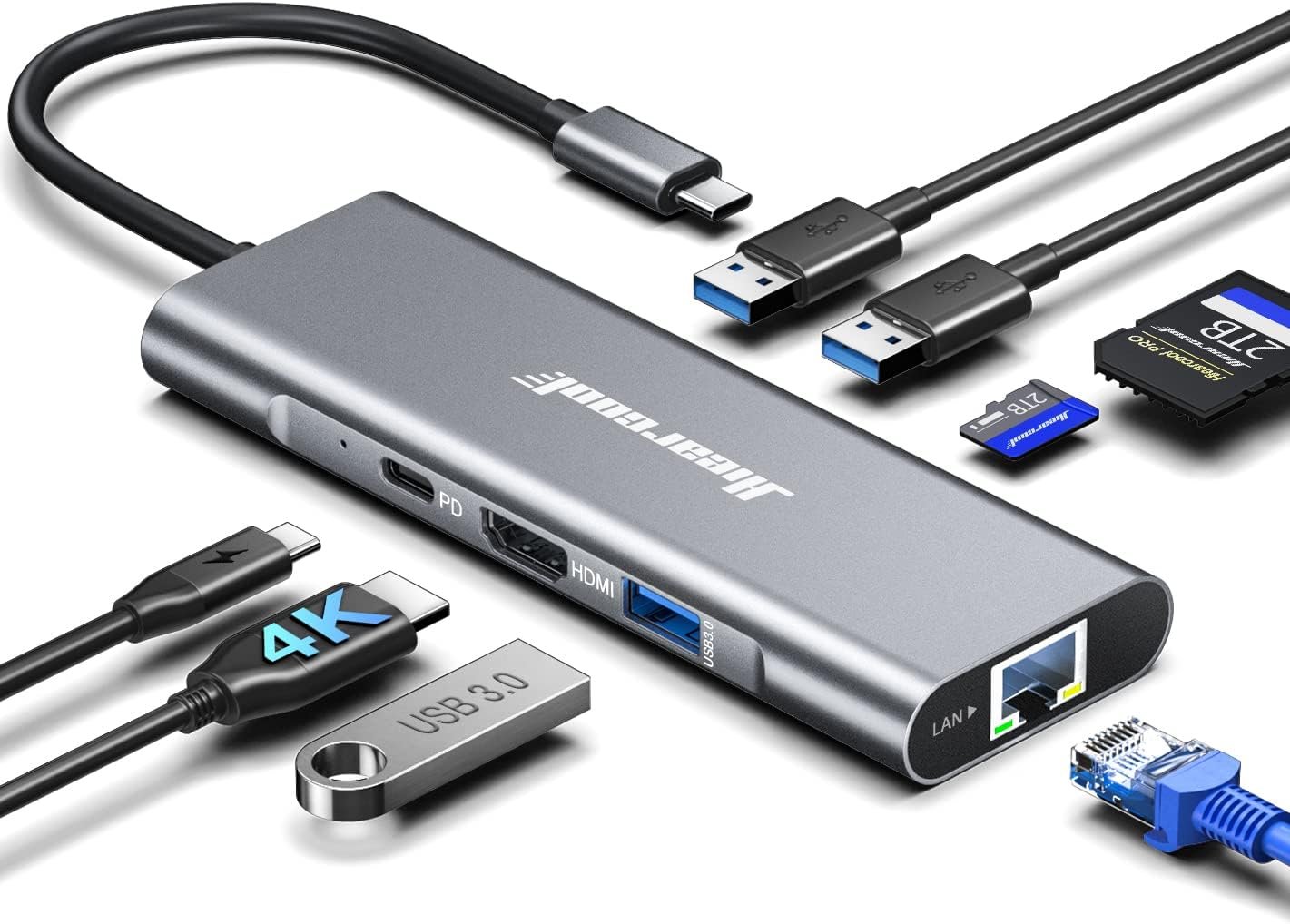
The Hiearcool USB C Hub, USB C Dock, 4K@60Hz HDMI, 1Gbps Ethernet, Space Gray, identified by ASIN B09T9PXW35, is an 8-in-1 USB-C multiport adapter designed to add several types of connectivity to compatible USB-C devices. Hiearcool’s product documentation identifies the model as UCN3610 and lists an HDMI output, Gigabit Ethernet, a USB-C Power Delivery input, three USB 3.0 ports, and SD and TF card slots.
The device supports HDMI output up to 4K at 60Hz under compatible conditions and provides Ethernet connectivity at 10/100/1000Mbps. Its three USB 3.0 ports are specified for data transfer rates of up to 5Gbps, while the SD and TF card reader is specified for speeds of up to 104Mbps.
The hub also supports USB-C Power Delivery pass-through of up to 100W when used with a compatible USB-C power adapter. This allows a compatible laptop or other host device to receive power while the hub is being used for additional connectivity.
This combination makes the Hiearcool hub relevant to home offices, business workstations, students, photographers, content creators, travelers, and laptop users who need more physical connections than their computer provides.
However, understanding what a USB-C hub actually does is important. Specifications such as 4K@60Hz, 1Gbps Ethernet, 5Gbps USB, and 100W Power Delivery describe capabilities under compatible conditions. They do not mean that every USB-C computer will automatically support every feature at its maximum specification.
This guide explains the hub’s main features, practical applications, compatibility considerations, limitations, and the differences between this type of multiport adapter and other connectivity solutions.
Key Features
Eight-in-One Connectivity
The Hiearcool B09T9PXW35 combines several interfaces into one compact USB-C accessory.
According to the manufacturer’s current product information, its eight functions include:
- One HDMI port
- One Gigabit Ethernet port
- One USB-C Power Delivery port
- Three USB 3.0 ports
- One SD card slot
- One TF/microSD card slot
The manufacturer identifies the USB 3.0 connections as supporting up to 5Gbps and the SD/TF card reader as supporting up to 104Mbps.
This variety is one of the central concepts behind a multiport hub. Instead of carrying separate adapters for HDMI, Ethernet, USB-A, and memory cards, a user can connect those peripherals through one USB-C accessory.
For a laptop user working at a desk, this can create a more centralized connection point.
4K HDMI Output at 60Hz
One of the most visible features is HDMI video output.
Hiearcool specifies support for 4K resolution at 60Hz through the HDMI port.
A 4K display has a resolution of 3840 × 2160 pixels, providing four times as many pixels as Full HD’s 1920 × 1080 resolution.
The 60Hz refresh rate means the display can refresh the image up to 60 times per second when the entire connection chain supports that mode.
This can be useful for several types of work:
- Office productivity
- Large spreadsheets
- Web browsing
- Video playback
- Presentations
- Photo work
- General desktop multitasking
- Compatible gaming applications
The important word is compatible.
For a 4K@60Hz configuration to work as expected, the host device, USB-C port, graphics system, display, HDMI cable, and software environment all need to support the required video mode.
The hub cannot add video-output capability to a USB-C port that does not support video.
Gigabit Ethernet
The Ethernet port supports 10/100/1000Mbps networking.
This is commonly referred to as Gigabit Ethernet.
For laptops without a built-in Ethernet jack, a USB-C Ethernet hub can provide a wired network connection.
Wired networking can be useful in situations where a stable connection is important, such as:
- Video conferencing
- Large file transfers
- Remote work
- Online classes
- Network-attached storage
- Office environments
- Software downloads
- Wired internet access at a desk
A 1Gbps Ethernet interface does not necessarily mean the user’s internet connection will operate at 1Gbps. The actual internet speed is limited by the network service, router, cabling, network conditions, and other components.
Instead, the specification describes the maximum capability of the hub’s Ethernet interface.
Three USB 3.0 Ports
The hub provides three USB 3.0 ports with a specified maximum data rate of up to 5Gbps.
These USB-A connections can be used with many common peripherals, including:
- Keyboards
- Mice
- USB flash drives
- External storage
- Card readers
- Printers
- Webcams
- Controllers
- USB microphones
- Other compatible USB accessories
This can be particularly useful on laptops that have replaced many traditional USB-A ports with USB-C connections.
As with the HDMI and Ethernet specifications, the 5Gbps figure is a maximum interface rate rather than a guaranteed real-world transfer speed.
Actual performance depends on the host computer, connected peripheral, storage hardware, cable, protocol overhead, and whether other devices are using the hub simultaneously.
SD and TF Card Readers
The hub includes both SD and TF/microSD card slots.
The manufacturer lists transfer speeds of up to 104Mbps for the card-reader function.
These slots can be useful for transferring files from:
- Digital cameras
- Action cameras
- Drones
- Smartphones
- Tablets
- Portable recording equipment
- Other devices using compatible memory cards
Having the card readers integrated into the hub can reduce the need for a separate card reader.
For photographers and content creators, this can be especially convenient when moving images or video files to a laptop.
Actual transfer performance will depend heavily on the memory card itself. A fast card reader cannot make a slow memory card operate at the reader’s maximum advertised speed.
100W USB-C Power Delivery Pass-Through
The hub supports USB-C Power Delivery pass-through up to 100W when used with a compatible USB-C power adapter.
This feature is useful for laptop users who want to connect several peripherals without sacrificing the computer’s ability to charge through USB-C.
A typical arrangement could look like this:
USB-C laptop → Hiearcool hub → HDMI display, USB accessories, Ethernet, and memory card
At the same time, a USB-C charger can be connected to the hub’s PD port.
The actual charging power delivered to the computer can be lower than the power rating of the connected charger because power can be consumed by the hub and connected peripherals.
The phrase “100W Power Delivery” should therefore be understood as the hub’s supported pass-through input capability rather than a guarantee that every host device will receive 100W.
Compact Multiport Design
The hub combines multiple connections into one device rather than requiring several individual adapters.
The product’s listed specifications identify an aluminum enclosure and dimensions of approximately 5.16 × 1.77 × 0.55 inches from a current third-party listing for the same ASIN/model.
A compact form factor can be helpful when working at a small desk or traveling between locations.
Instead of carrying an HDMI adapter, Ethernet adapter, USB hub, and card reader separately, users can consolidate several functions into one accessory.
How It Can Be Used
Creating a Laptop Workstation
One of the most practical applications is turning a USB-C laptop into a more traditional workstation.
For example, a user could connect:
- External 4K monitor through HDMI
- Keyboard through USB-A
- Mouse through USB-A
- Ethernet cable
- USB-C charger
- SD card when needed
This arrangement can provide many of the connections normally associated with a desktop computer.
The laptop remains the central computing device while the hub acts as the connection point for the accessories.
Connecting an External Monitor
The HDMI port can be used to connect a compatible USB-C host device to an external monitor, television, or projector.
A 4K@60Hz configuration can be useful for users who want a large desktop workspace.
For example, a laptop screen could display email and communication tools while the external monitor displays documents, spreadsheets, design software, or browser windows.
Before purchasing or configuring the setup, it is important to verify that the laptop’s USB-C port supports video output.
Not every USB-C port supports DisplayPort Alt Mode or other video-output functionality.
Home Office and Remote Work
Remote workers often use a combination of external displays, wired networking, keyboards, mice, webcams, and storage devices.
A multiport USB-C hub can consolidate these connections.
The Gigabit Ethernet port can be useful when wired networking is preferred over Wi-Fi, while the HDMI connection can support an external display when the host device permits video output.
The result can be a workstation that requires only one primary USB-C connection to the laptop.
Photography and Video Workflows
The SD and TF card readers provide another practical application.
A photographer could remove a memory card from a camera and insert it directly into the hub, assuming the card type is supported.
Files can then be transferred to the connected computer.
The workflow can be useful for:
- RAW photographs
- JPEG images
- Short video clips
- Drone footage
- Action-camera recordings
- Audio recordings
Large media files can take considerable time to transfer, so actual performance will depend on the card’s speed and the computer’s storage system as well as the hub.
Presentations
The HDMI port can also be useful for presentations.
A laptop equipped with a compatible USB-C port can potentially connect to a conference-room display, projector, or television through the hub.
This can reduce the need to carry a separate video adapter.
However, presentation environments can use different display standards and cables, so testing the complete setup before an important presentation is advisable.
Wired Networking for Laptops
Some modern laptops do not include an RJ45 Ethernet port.
The hub can provide one through its Gigabit Ethernet interface.
This can be useful for a desk where Ethernet is already available or for environments where wired networking is preferred.
Wired networking can also be helpful when transferring large amounts of data to another device on a local network.
Connecting Multiple USB Peripherals
Three USB 3.0 ports can provide connections for common peripherals.
A simple setup could include:
- Keyboard
- Mouse
- External storage
Another user might instead connect:
- Webcam
- Microphone
- Flash drive
The actual combination depends on the power and bandwidth requirements of the devices.
Who It May Be Suitable For
Laptop Users With Limited Ports
People using laptops with a small number of USB-C connections may find a multiport hub useful for expanding their available connectivity.
Home Office Users
A home office setup often benefits from a centralized connection point for monitors, networking, USB accessories, and charging.
Students
Students may use USB-C laptops while still relying on USB-A accessories, HDMI displays, USB drives, and memory cards.
A multiport hub can provide access to these different interfaces without requiring several separate adapters.
Photographers
The built-in SD and TF card slots can be useful for transferring photographs and other media.
The usefulness depends on the card formats used by the photographer’s equipment.
Content Creators
Creators working with cameras, memory cards, external displays, storage devices, and wired networking can potentially use several of the hub’s functions in the same workflow.
Business Travelers
A compact multiport adapter can reduce the number of individual accessories needed when moving between home, office, hotel, and meeting environments.
Users With USB-C Tablets
Some USB-C tablets support external displays, USB peripherals, memory cards, networking, and USB-C charging.
Where the tablet’s hardware and operating system support these functions, a hub can provide a convenient connection point.
Compatibility should always be confirmed for the specific tablet model.
Important Things to Consider
USB-C Does Not Automatically Mean Full Compatibility
USB-C describes a connector type, not a single universal feature set.
Two USB-C ports can look identical while supporting different capabilities.
One may support:
- USB data
- Charging
- Display output
Another may support only:
- USB data
- Charging
This distinction is especially important for the HDMI function.
The host device needs to support the appropriate video-output technology for the hub’s HDMI connection to work.
4K@60Hz Depends on the Entire System
The hub’s HDMI output is specified for 4K at 60Hz.
However, reaching that mode requires more than simply connecting a 4K monitor.
The following components can matter:
- Host computer
- USB-C port
- Graphics hardware
- Operating system
- Monitor
- HDMI cable
- Display settings
If any part of the chain has a limitation, the available resolution or refresh rate may be lower.
For this reason, users should check the specifications of their particular laptop or tablet before assuming that 4K@60Hz will be available.
One HDMI Output Is Not a Multi-Monitor Solution
This particular hub has one HDMI video output.
It should therefore not be confused with multi-display docking stations that provide multiple independent display outputs.
A user seeking two or more external monitors should examine the host device’s multi-display capabilities and choose a docking solution designed for that purpose.
Ethernet Speed Is Not the Same as Internet Speed
The Ethernet port supports up to 1Gbps.
That does not mean the internet connection will automatically reach 1Gbps.
For example, if an internet service provides 300Mbps, the hub cannot turn it into a 1Gbps internet connection.
Likewise, local-network performance depends on the router, switches, Ethernet cable, server, and receiving device.
USB Devices Share Available Resources
The three USB 3.0 ports share the upstream USB-C connection.
If a user transfers data from multiple high-speed storage devices simultaneously, the devices can compete for available bandwidth.
For everyday peripherals such as keyboards and mice, this generally matters much less because their data requirements are comparatively small.
Power Delivery Requires a Suitable Charger
The hub supports up to 100W Power Delivery pass-through according to Hiearcool’s product information.
A compatible USB-C charger is still required.
If the charger itself supplies less power than the laptop needs, the laptop may charge slowly, maintain its current battery level, or continue losing charge depending on its workload.
The hub should therefore be considered part of a charging system rather than a replacement for the charger itself.
Some USB-C Devices Have Special Restrictions
Phones, tablets, handheld gaming devices, and other USB-C products can have different restrictions.
Some support external monitors. Some do not.
Some support external storage. Others may have limitations involving file systems or power.
Compatibility should be checked against the exact host device rather than inferred from the presence of a USB-C connector alone.
Heat Is Possible During Use
Multiport hubs combine several functions in a small enclosure.
It is normal for electronic adapters to become warm during operation, particularly when several functions are active.
Hiearcool states that this model uses a GL823K chip and describes its design as intended to support cooler operation and stable performance.
Users should still allow reasonable airflow and avoid covering the hub during demanding use.
Card Reader Performance Depends on the Card
The manufacturer lists up to 104Mbps for the SD/TF card reader.
Actual speeds depend on the memory card, file sizes, reader workload, operating system, and storage destination.
A high-performance memory card does not necessarily transfer at its maximum theoretical speed through every reader or workflow.
Comparing General Categories of USB-C Connectivity
Basic USB-C Adapters
A simple USB-C adapter may provide one additional connection, such as HDMI or USB-A.
This can be appropriate when a user has one specific connectivity problem and does not need several ports.
The advantage is simplicity.
The limitation is that multiple adapters may be needed as requirements expand.
Multiport USB-C Hubs
Multiport hubs combine several connections in one accessory.
The Hiearcool 8-in-1 model falls into this category, combining HDMI, Ethernet, USB, card readers, and Power Delivery.
This category can be useful for users who regularly work with multiple types of peripherals.
USB-C Docking Stations
Docking stations generally provide a broader collection of ports and may be designed for more permanent workstation setups.
Depending on the model, they can include multiple display outputs, Ethernet, USB ports, audio, card readers, and USB-C Power Delivery.
A docking station may therefore be more appropriate for users building a full desktop-style environment around a laptop.
Travel Hubs
Travel-oriented hubs tend to prioritize small size and portability.
They may offer fewer ports than a larger desktop dock but can be easier to carry.
The appropriate choice depends on whether the primary goal is mobility or workstation expansion.
Specialized Display Adapters
Some USB-C accessories focus almost entirely on video output.
These can make sense for users who only need to connect a computer to a monitor, projector, or television.
A multiport hub becomes more useful when video is only one part of the connectivity requirement.
Practical Setup Advice
Check the Host USB-C Port Before Connecting Everything
The first step is to verify what the computer’s USB-C port supports.
Look for specifications relating to:
- USB data
- DisplayPort Alt Mode
- Thunderbolt
- USB4
- Power Delivery
The presence of a USB-C connector by itself does not establish that HDMI output through a hub will work.
Connect the Charger Through the PD Port When Appropriate
For a laptop workstation, the USB-C charger can be connected to the hub’s PD input while the hub remains connected to the laptop.
This arrangement allows supported devices to use the hub’s additional connections while maintaining USB-C charging.
The charger should have enough capacity for the host device and the power demands of the setup.
Use a Suitable HDMI Cable
For a 4K@60Hz configuration, the display, host, hub, and cable all need to support the required signal.
A suitable HDMI cable should be used, particularly when troubleshooting a setup that defaults to a lower resolution or refresh rate.
Connect Ethernet to an Appropriate Network
If using the Gigabit Ethernet function, connect the hub to a compatible router, switch, or network outlet.
Network speed can then be checked from the operating system.
If the connection negotiates at 100Mbps rather than 1Gbps, the issue may involve the network equipment, cable, settings, or another part of the network path.
Add Peripherals Gradually
When setting up a new hub, connecting devices one at a time can make troubleshooting easier.
Start with the host connection and primary display or network connection, then add USB devices and memory cards.
If something stops working after a particular device is connected, it becomes easier to identify the source of the problem.
Frequently Asked Questions
What is the Hiearcool B09T9PXW35?
It is an 8-in-1 USB-C multiport hub identified by Hiearcool as model UCN3610. It provides HDMI, Gigabit Ethernet, USB 3.0, USB-C Power Delivery, SD, and TF/microSD connectivity.
Does it support 4K at 60Hz?
Yes. Hiearcool specifies HDMI output up to 4K at 60Hz for this model.
The host device and other components of the display chain must also support the required video mode.
Does it have Ethernet?
Yes. The hub includes a 10/100/1000Mbps Ethernet interface.
Can it provide Gigabit Ethernet on a laptop?
It can provide a Gigabit Ethernet interface to a compatible USB-C host device.
Actual network throughput depends on the host, network equipment, Ethernet cable, and internet or local-network conditions.
Does it support USB 3.0?
Yes. The hub has three USB 3.0 ports, with Hiearcool specifying data transfer rates of up to 5Gbps.
Does it include SD and microSD card readers?
Yes. The product includes both an SD card slot and a TF/microSD card slot. Hiearcool lists speeds of up to 104Mbps for the card-reader function.
Does it support charging?
The hub includes a USB-C Power Delivery input designed for pass-through charging. Hiearcool specifies compatibility with USB-C power adapters up to 100W.
Does the hub itself include a 100W charger?
The 100W specification refers to Power Delivery pass-through capability. It should not be interpreted as meaning that a 100W wall charger is built into the hub.
A compatible USB-C power adapter is required for Power Delivery.
Can it connect a laptop to a 4K monitor?
A compatible laptop with USB-C video output can potentially connect to a 4K monitor through the hub’s HDMI port.
The laptop’s USB-C port must support the necessary display-output technology.
Can it connect to a television?
A compatible television with an appropriate HDMI input can be used as an external display when the host device supports video output through the hub.
Can it connect multiple external monitors?
This model has one HDMI video output. It is not designed as a general-purpose multi-monitor dock with several independent display outputs.
Can it be used with a MacBook?
Hiearcool identifies MacBook Pro and MacBook Air among compatible device categories for this model.
Specific functionality can still depend on the exact MacBook generation, operating system, USB-C/Thunderbolt capabilities, and display configuration.
Can it be used with Windows laptops?
Hiearcool lists Dell, HP, Lenovo, and other USB-C laptops among compatible device categories.
As with any USB-C hub, the exact model and port capabilities should be checked before purchase or deployment.
Can I use a USB-C hub with any USB-C port?
No.
USB-C is a connector standard rather than a guarantee of identical capabilities.
A particular port may lack video output, sufficient power, or another feature required by the hub.
Will it make Wi-Fi faster?
No. The hub does not increase Wi-Fi performance.
It provides a wired Ethernet connection that can be used instead of Wi-Fi where a compatible wired network is available.
Does 1Gbps Ethernet guarantee 1Gbps internet?
No.
The 1Gbps figure describes the Ethernet interface’s maximum negotiated capability. Internet speed depends on the internet service and the rest of the network.
Can all ports be used simultaneously?
The hub is designed to provide several simultaneous connections, but available bandwidth and power are shared among the connected functions.
The actual combination of devices can therefore affect performance.
Is this a docking station?
It can be described as a USB-C dock or multiport adapter, but it is more limited than larger full-featured desktop docking stations.
Its primary purpose is to add several common connections to a USB-C host device.
Is it useful for photographers?
The integrated SD and TF card readers can make it useful for workflows involving compatible camera and memory-card formats.
Transfer speed depends on the card, reader, computer, and storage destination.
Can it be used for gaming?
The hub can provide HDMI display connectivity, USB peripherals, Ethernet, and charging for compatible systems.
However, gaming performance depends primarily on the host device, display, network, and peripherals. The hub itself does not increase the computer’s graphics performance.
Conclusion
The Hiearcool USB C Hub B09T9PXW35 is designed to address a common problem with modern computers: a shortage of physical connections.
Its 8-in-1 design combines a 4K@60Hz HDMI output, 10/100/1000Mbps Ethernet, three USB 3.0 ports, SD and TF card readers, and USB-C Power Delivery pass-through in a single accessory.
For laptop users, this combination can be useful when moving between a portable computer and a more traditional workstation. One USB-C connection can potentially provide access to an external display, wired network, USB-A accessories, memory cards, and charging.
The key consideration is compatibility. USB-C ports differ considerably between computers, tablets, and other devices. The computer must support the functions being requested, particularly video output for the HDMI connection. Similarly, the 4K@60Hz, 5Gbps USB, 1Gbps Ethernet, and 100W Power Delivery figures represent maximum capabilities under suitable conditions rather than guaranteed performance in every configuration.
It is also useful to distinguish a multiport hub from a full docking station. A compact 8-in-1 adapter can provide several important connections without the complexity of a larger desktop dock, while users who need multiple monitors, additional display standards, extensive USB expansion, or other specialized functions may need a different type of connectivity solution.
For people researching USB-C connectivity, the Hiearcool hub provides an example of how several common interfaces can be consolidated into one portable accessory. Its usefulness ultimately depends on the ports available on the host device and the specific peripherals that need to be connected.
You can check more details on Amazon here.
Amazon Associate Disclosure: As an Amazon Associate, we earn from qualifying purchases.